Export Shopify data to CSV. Orders, Products, Customers, and more.
Export products, orders, customers and more from your Shopify store with advanced filters, and automated scheduling. Powerful exporting that just works.


Powering data exports for the world's best Shopify stores:


Why Shopify store owners choose Metorik for exporting
Shopify’s built-in CSV export is limited to a handful of fixed columns, and dedicated export apps get expensive fast. Metorik gives you the reliable, comprehensive Shopify export solution you actually need.
- Zero load on your store: Metorik syncs your data over to our high-performance infrastructure so exports never slow your Shopify store down.
- Filter, customise, then export: Stop wrestling with a 50,000 line spreadsheet in Excel. Build the exact CSV you need, in just a few clicks.
- Reliable CSVs, every time: Get exports that work as intended, every-time. Exports that notify you when ready, with zero timeouts, no half-finished files, no guesswork.

Export your Shopify data, including order Custom Fields.
- Orders
- Customers
- Products
- Variations
- Carts
- Refunds
- Discounts
- Report Data
- Custom Fields
Get unfettered access to your own Shopify data so you can run deep-dive analysis offsite, feed other tools, or migrate information with ease.
- Export Shopify orders: Pull line items, customer details, shipping addresses, payment methods, taxes, and fulfillment status, from yesterday’s shipments to every order you’ve ever received.
- Export Shopify products: Variations, SKUs, inventory levels, categories, tags, pricing, and descriptions, ready for catalog updates or migration.
- Export Shopify customers: Contact details, order history, lifetime value, and segments, perfect for targeted marketing and reporting.
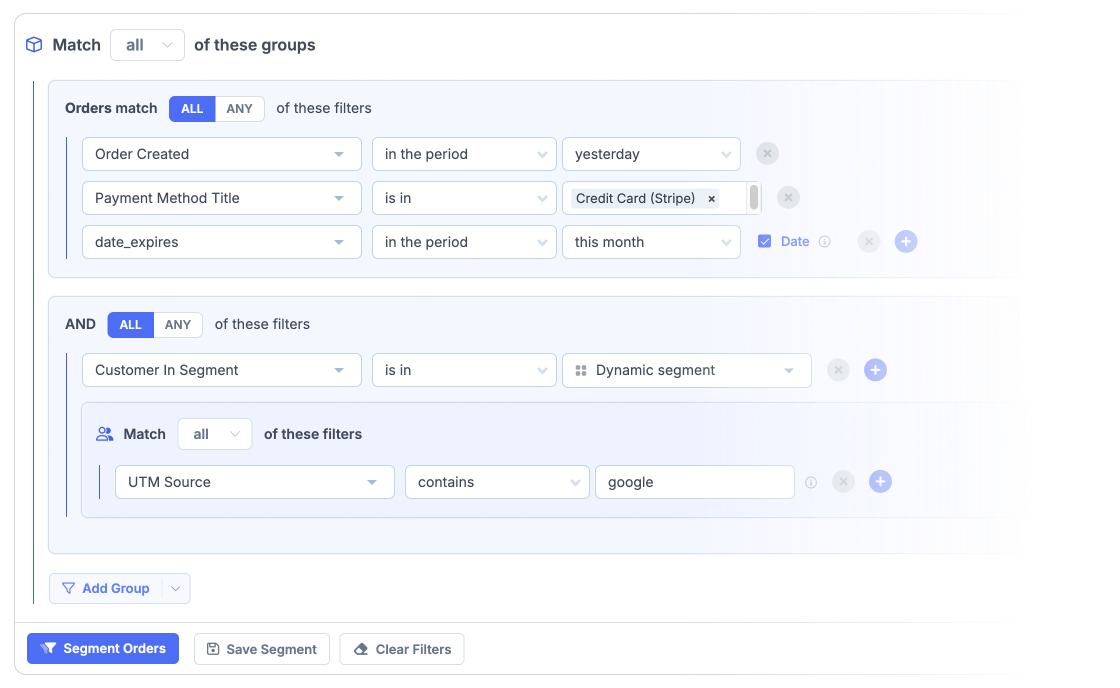
Why export 8,510 rows when you only need 200?
Use Metorik’s powerful segmenting to narrow in on the exact orders, products, or customers you need before you export. No more wasting hours cleaning up massive CSV files.
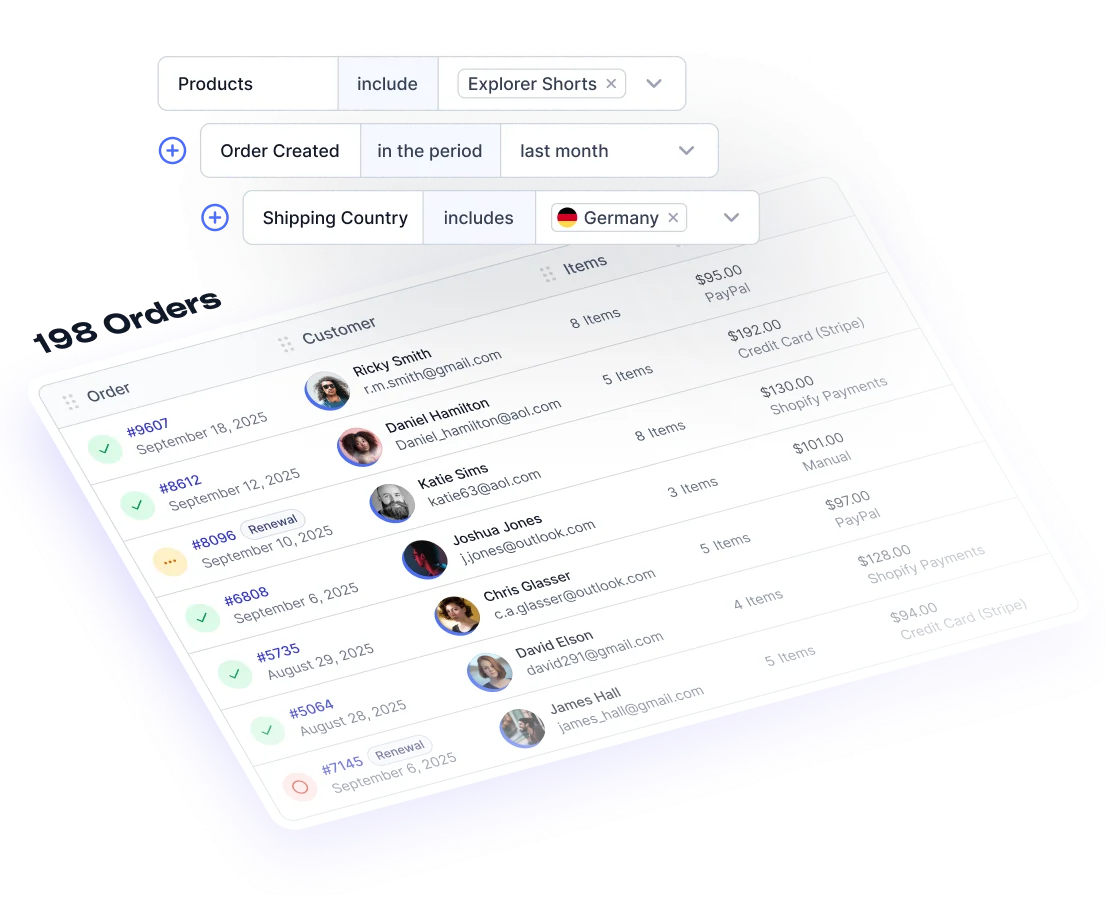
- Filter by any criteria: Build the exact set of orders, products, or customers you need using hundreds of filters, order status, date range, payment method, sales channel, product, customer type, location, and more.
- Combine filters for precision: Need every repeat-customer order from last month that contains a specific product and shipped to Germany? No problem.
- Save time, reduce errors: Get a clean, focused CSV every time, ready for your warehouse, your accountant, or any third party, with no manual clean-up.


⭐⭐⭐⭐⭐
Exporting through Metorik has been an absolute game-changer. We can rely on going into Metorik, hitting export, and all correct data being included.
— Brian Zarlengan
General Manager, Output 🇺🇸
Stop wasting time on repetitive manual tasks. Need to send a list of new customers to your fulfillment partner every morning? Or a sales report to your boss every Monday? Schedule any Shopify export to run on a daily, weekly, or monthly basis at a time of your choosing, delivered automatically to your inbox, Slack or CSV file.
Automatic recurring Shopify exports. Set and forget – Metorik won't.
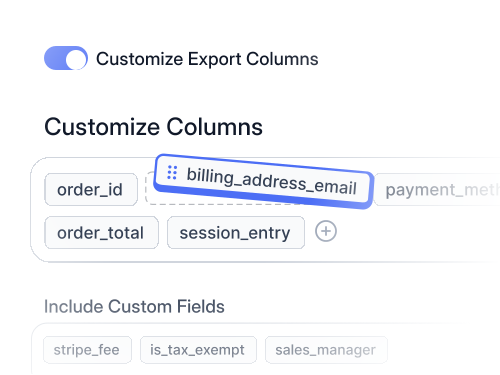
Control what’s included
Need the email, payment method and order total of last week’s orders from France, every Monday? No problems.

Flexible Scheduling
Choose the timing that works for you, from Monthly, Weekly, or Daily, even down to the exact half hour.
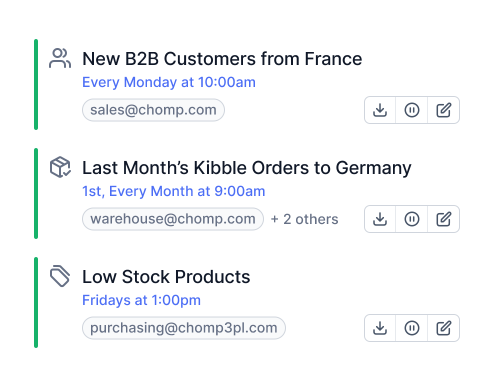
Automate Operations
A simple, reliable way to automate your operational workflows and data sharing within your organisation and with third-parties.
Unlimited Users Simple Pricing
All Features
Our pricing scales based on your average monthly orders. Better yet, one subscription covers ALL your stores.
- All Reports & Analytics
- Includes Emails Need More?
- Unlimited Contacts
- Connect Multiple Stores
- Connect up to Stores


⭐⭐⭐⭐⭐
Metorik is one of the smoothest interfaces I've ever used. Segmentation functionality is second to none.
Automatic exports of highly detailed segments (customers or orders), and detailed reporting on whatever you can think of.
— Simon Geldner
Co-founder, Ophena 🇸🇪
❤️
Exceptionally well-loved support from real humans,
not chat bots.
Our support doesn't end at signup – that's where it really begins..
Everyone on the Metorik team helps out with support, so the person you're chatting with has in-depth product knowledge and our finger on the pulse with feedback.
We're invested in seeing your store succeed, and we're here to do what we can.
What stood out to me was the partnership. Metorik didn't just point me to documentation - you took the time to understand our business and support us personally.

…also, their support is great as they always respond very fast and take time for our needs.

On top of this the analysis tools are excellent and the customer support is seriously second to none.

Their team is amazing, support is fast, UI is NEARLY perfect, the founder is involved and takes feature requests seriously and quickly if the use-case is clear.

Their team is amazing, support is fast, UI is NEARLY perfect, the founder is involved and takes feature requests seriously and quickly if the use-case is clear.
I've made feature suggestions, and twenty minutes later they’ve told me told me to refresh my screen, and BOOM! It's already there. Incredible!

The speed with which Bryce and his team provide support, fix bugs and deploy features is beyond incredible.
Metorik is one of the very best. It's extremely intuitive, fast, and customizable. The support team is very responsive, as well. I would recommend this to all of my clients.

App support is the best I’ve seen … always responsive and has helped us with every single thing we’ve asked for.

In about 2 clicks, Metorik has given my CRM the UI of Stripe, the data analytics of Tableau, and the customer service of the Ritz-Carlton. I can't recommend them enough.
exceptional attention to my employees whenever we have a problem or inquiry. The response time is truly remarkable

In about 2 clicks, Metorik has given my CRM the UI of Stripe, the data analytics of Tableau, and the customer service of the Ritz-Carlton. I can't recommend them enough.
Metorik remains our trusted compass, providing the insights we need to steer confidently. A sincere thank you to the Metorik team for their unwavering support.

Best yet, the team at Metorik are super supportive - what more can a business ask for?

“…also, their support is great as they always respond very fast and take time for our needs.”

Shopify Export FAQs
Can't find what you're looking for below? Read our Help Docs
How is this different from Shopify's built-in export?
Shopify's built-in CSV export is limited to a handful of fixed columns and recent data, with almost no filtering. Metorik gives you unlimited historical data, custom column selection, customf fields (additional info) on your orders, advanced filtering across 500+ conditions, and automated scheduling that Shopify (and most dedicated export apps) simply don't offer.
Can I export all my products with variants and inventory?
Yes. Export complete product catalogs including every variant, SKU, inventory level, and pricing. Perfect for catalog management, supplier updates, or a platform migration, all delivered as a clean CSV ready for Excel or Google Sheets.
What file formats are supported?
Every export is a clean CSV with full compatibility. CSV files open straight into Excel (XLSX), Google Sheets, and virtually every business application, with the exact columns you choose, in the order you choose them.
Can I export Shopify orders automatically on a schedule?
Yes. Set any export to run automatically daily, weekly, monthly, or at a custom interval, and have it delivered to your email inbox, Slack channel, or synced directly to a webhook. Each scheduled export can have its own filters, columns, and destination, so you never have to manually pull data again.
Is there a limit on export size?
No artificial limits on export size or historical data. Export thousands, or hundreds of thousands, of orders, products, or customers in a single file. Large exports run in the background on our high-performance servers, with zero load on your Shopify store, and notify you the moment they're ready.
What Shopify data can I export?
Everything: orders, products, variations, customers, carts, refunds, discounts, and report data, all with advanced filtering. You can also include Shopify tags, and additional info fields alongside your standard store data, all in a single file.

Still have questions?
Can't find the answer you're looking for? Chat to our friendly team.

 +
+


Ready to export your Shopify data?
Join 10,000+ store owners who trust Metorik for reliable, automated Shopify data exports. Start your free trial and get your first export in minutes.
✅ 30-Days Free. 💳 No Credit Card required.