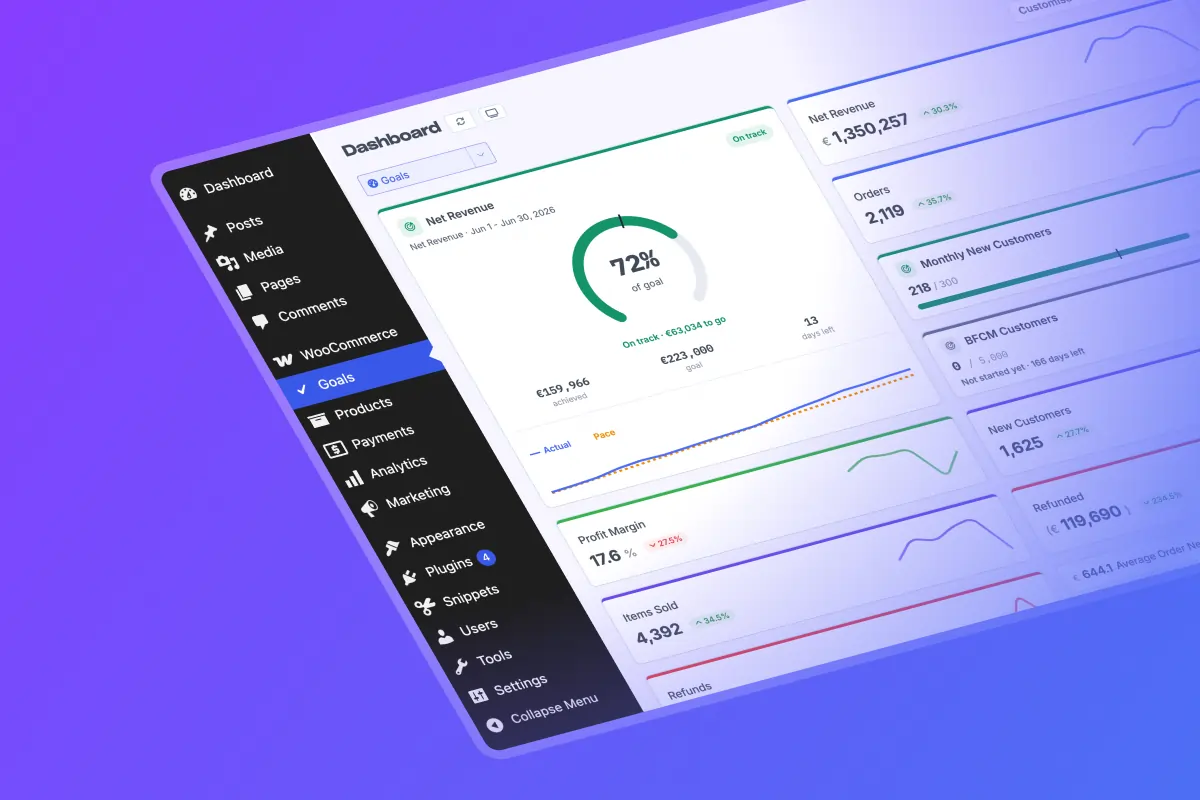

WooCommerce doesn't have a built-in sales-goal feature. Its native Analytics shows you reports and period-over-period comparisons, but it can't store a target, track your progress toward it, or tell you whether you're on pace to hit it mid-month. To actually set and track sales goals in WooCommerce, you need a dedicated analytics layer that sits on top of your store, like Metorik.
This guide covers what WooCommerce can and can't do on its own, what "tracking a goal" should really mean, and how to set up goals that tell you whether you're winning today, not just at the end of the month.
What Woo can (and can't) do out of the box
WooCommerce's native Analytics is genuinely useful for looking backward. You get reports for orders, net sales, products, categories, coupons, and taxes, and you can compare any date range against the previous period to see whether you're up or down.
What it can't do is hold a goal. There's no place to say "I want $50,000 in net sales this month" and have WooCommerce track you against it. So the moment you want to do the most basic thing a goal requires (set a number, watch progress fill toward it, and know if you're ahead or behind), you've hit the edge of what native reporting offers.
That's the gap. Native Analytics answers "what happened?" A goal answers "are we going to hit the number, and are we on track right now?" Those are different questions, and only the second one helps you change the outcome while there's still time.
Woo’s native Analytics | Metorik’s Goals | |
|---|---|---|
Backward-looking reports | ✅ Yes | ✅ Yes |
Store a target you track against | No | ✅ Yes |
Progress tracking toward a goal | No | ✅ Yes |
Pace: ahead or behind today | No | ✅ Yes |
Recurring goals that roll over each period | No | ✅ Yes |
Goals on custom metrics & segments | No | ✅ Yes |
"Stay under" targets (costs, refunds) | No | ✅ Yes |
What "tracking a sales goal" should actually mean
Most goal tools and spreadsheets only tell you the score at the final whistle. You set $50k for the month, and on the 30th you find out whether you made it. By then it's history.
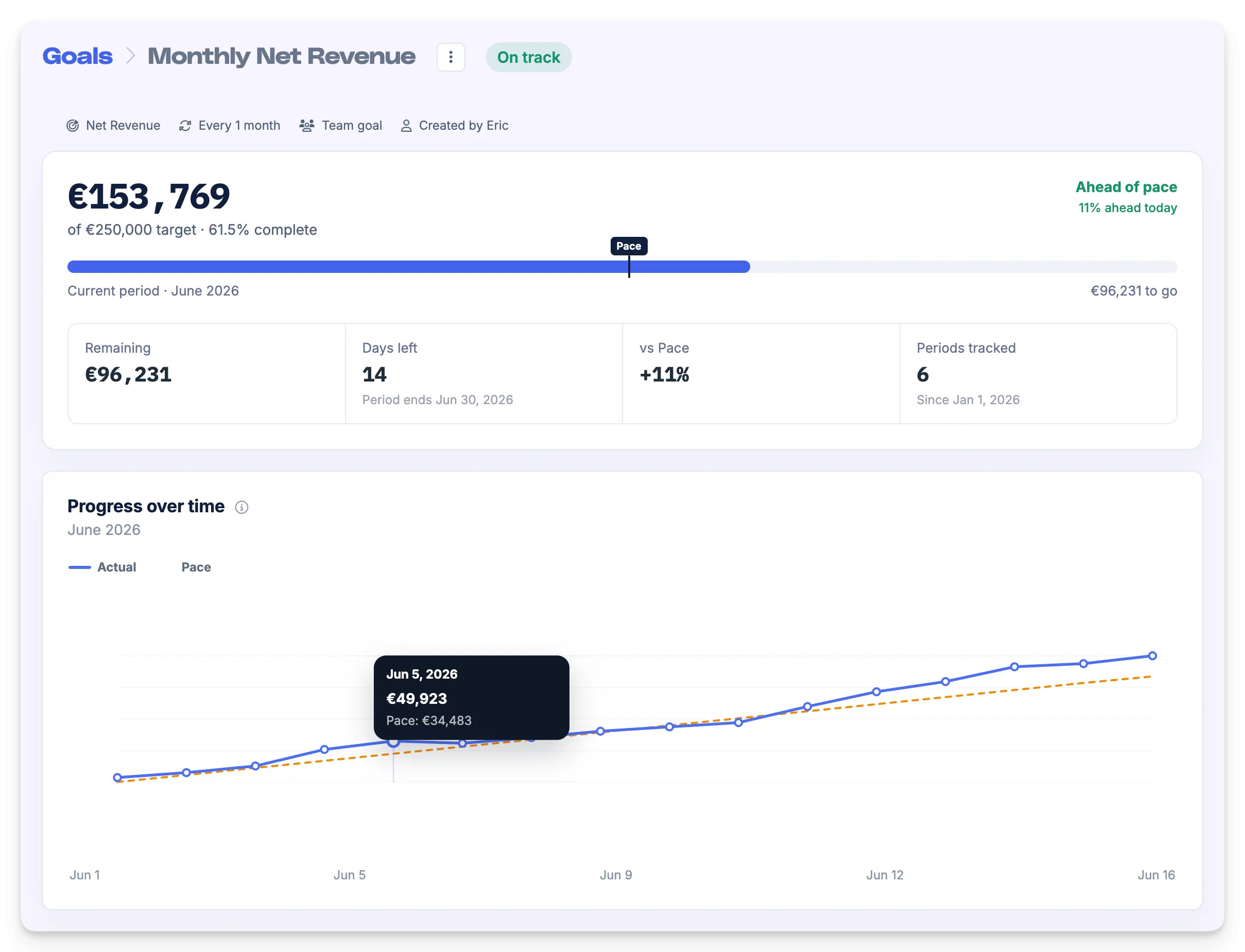
The number that actually matters is pace: at any point mid-period, are you ahead of or behind the run-rate you'd need to hit the target? If you're 12 days into a 30-day month, you should be roughly 40% of the way to your goal. If you're at 30%, you're behind and there's still time to do something about it. If you're at 50%, you're ahead and can push for a stretch.
A target without pace is just a wish with a deadline. Pace is what turns a goal into something you can manage day to day.
How to set sales goals in WooCommerce with Metorik
Metorik connects to your WooCommerce store and adds the goal-tracking layer WooCommerce is missing. Once your store is connected, creating a goal takes a guided walkthrough:
1. Pick a Metric, Segment Total, or Custom Metric
A searchable picker covers standard report metrics (sales, orders, refunds, and so on), your own custom metrics, and segment totals. This is the part that makes Metorik goals far more flexible than a plain revenue target. You can set a goal on essentially anything Metorik measures, not just gross sales.
2. Set a target, or start from a suggestion.
Once you choose a metric, Metorik pre-fills a starting target 5% above your previous period's total, so you can create a meaningful goal in seconds and adjust from there. The input respects your store's currency formatting.
3. Choose a direction.
Aim to reach at least the target (revenue, orders, new customers) or stay at most under it, which is exactly what you want for costs or refunds, where lower is better.
4. Pick a schedule.
Make it a one-time goal between two dates, or a recurring goal on a cadence of daily, weekly, monthly, quarterly, yearly, or a custom interval. Recurring goals can run with no end date.
That recurring option is the one most worth calling out. Set "hit $50k every month" once, and it rolls forward on its own, period after period, keeping a full history of how each month landed. You're not rebuilding the same target every time a month ticks over.
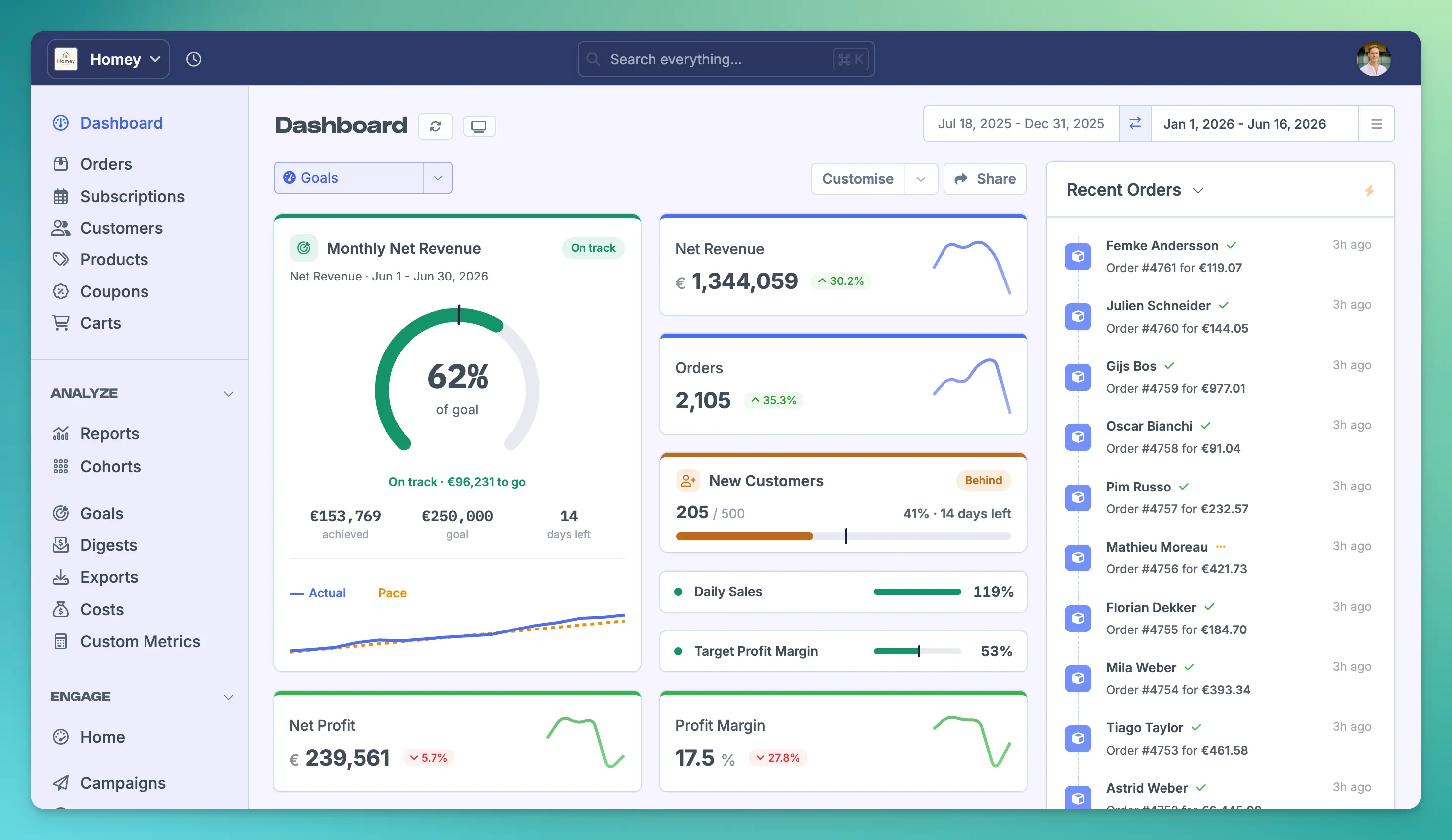
Once a goal is live, you get a progress bar with a pace marker (the gap between the fill and the marker is how far ahead or behind you are at a glance), a progress-over-time chart plotting your actual numbers against the pace you'd need, and stat tiles for what's remaining and how many days are left. Recurring goals also keep a per-period history so you can see every month's result and open any one to inspect its own pace chart.
You can also pin goals straight to your dashboard as cards in several sizes, from a large progress arc with a sparkline down to a single-line row for dense dashboards. Each is color-coded by status so on-track, behind, and missed goals are obvious at a glance. The whole thing supports light and dark mode.
Sales goal ideas for WooCommerce stores (beyond revenue)
Because Metorik goals can be built on custom metrics and segments, you're not limited to "make more money this month." Some goals worth setting:
Monthly net sales: the classic. Set it recurring and let it roll.
Average order value: push AOV above a threshold instead of chasing raw revenue.
New customers acquired: a growth goal that isn't just top-line sales.
Repeat-purchase rate or returning-customer revenue: track retention, not just acquisition.
Refund rate or refund total: set a stay-under goal to keep returns in check.
Revenue from a specific product line or segment: goal a single collection, a customer segment, or a subscription cohort, not the whole store.
Orders per week: a faster cadence for high-volume stores that want a tighter feedback loop.
The point: a goal should map to whatever you're actually trying to move this quarter. Revenue is one lever. Most stores have several.
Frequently asked questions
Does WooCommerce have a built-in sales goal feature?
No. WooCommerce's native Analytics provides reports and period-over-period comparisons, but it has no feature for setting a target and tracking progress or pace against it. You need a third-party tool such as Metorik to set and track sales goals in WooCommerce.
How do I track progress toward a sales target in WooCommerce?
Connect your store to an analytics tool that supports goals, set your target metric and amount, and the tool tracks your live progress against it. Metorik adds a progress bar, a pace marker showing whether you're ahead or behind today, and a chart of your actual numbers versus the required pace.
Can I set a recurring monthly sales goal in WooCommerce?
Not natively, but yes with Metorik. You can create a recurring goal on a daily, weekly, monthly, quarterly, yearly, or custom cadence that rolls over automatically each period and keeps a full per-period history, so you set "every month" once rather than recreating the target each time.
Can I set goals on metrics other than revenue?
Yes. Metorik goals can be set on standard metrics, custom metrics, and segment totals, so you can track things like average order value, repeat-purchase rate, refund totals, new customers, or the revenue from a single product line or customer segment.
Shopify has native targets now. Does WooCommerce?
Shopify added a native Targets feature to its Analytics in 2026, but those targets are tied to fixed periods and standard metrics. WooCommerce has no equivalent native feature at all. A tool like Metorik covers both platforms and adds recurring goals, custom-metric goals, and pace tracking on top.
Set your first goal
If you're running a WooCommerce store and tracking goals in a spreadsheet (or not tracking them at all), Metorik gives you proper sales goals with pace tracking in a few clicks. See how Goals work in Metorik and start a Free 30-Day Trial.