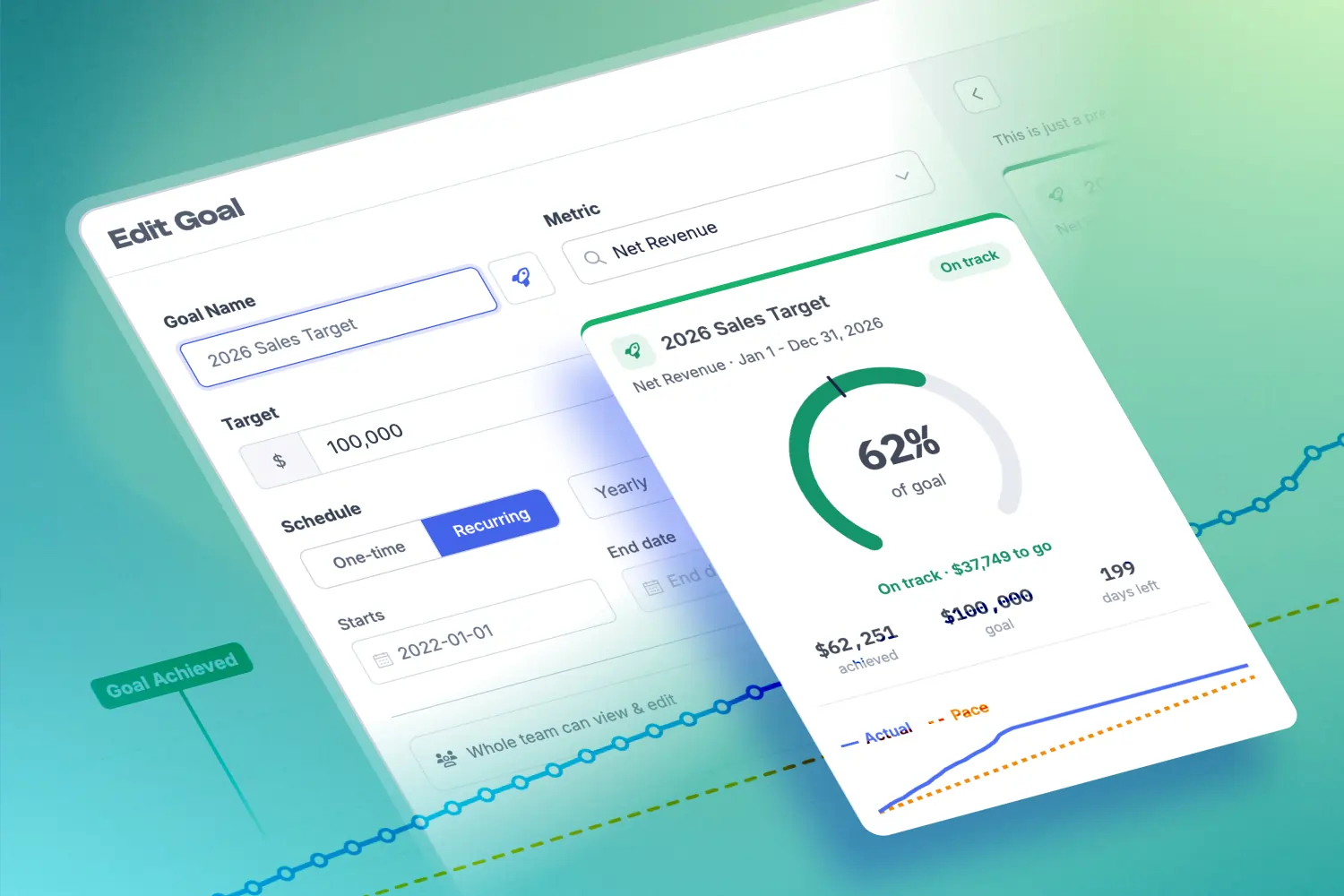

Today we're introducing Metorik Goals, a new way to set targets for your store and actually know, day to day, whether you're going to hit them.
Set a goal or target on any metric, segment total, or even custom metrics, track it one-time (ie: June 2026) or auto-recurring (ie: Weekly, Monthly, Quarterly), and see at a glance whether you're ahead or behind the pace you need. All inside Metorik, across both Shopify and WooCommerce stores. It's available now, on every plan.
Here's what makes Goals different: it doesn't just show how far along you are. It shows whether you're on pace. So "are we going to make it?" has an answer today, not on the last day of the month.
Why we built Goals
Deciding on a target is easy. The hard part is keeping your whole team aligned. It’s when in the middle of the period, when the number you care about is only half-done and you can't tell whether that's fine or a problem.
Most of us end up tracking goals in a spreadsheet that's stale by Tuesday, or just waiting until closer to the end to find out how it went.
We wanted something that lives where your data already is, updates itself, renews each period automatically, and tells you if you're winning while there's still time to do something about it.
What Goals does
🎯 A goal for (almost) anything
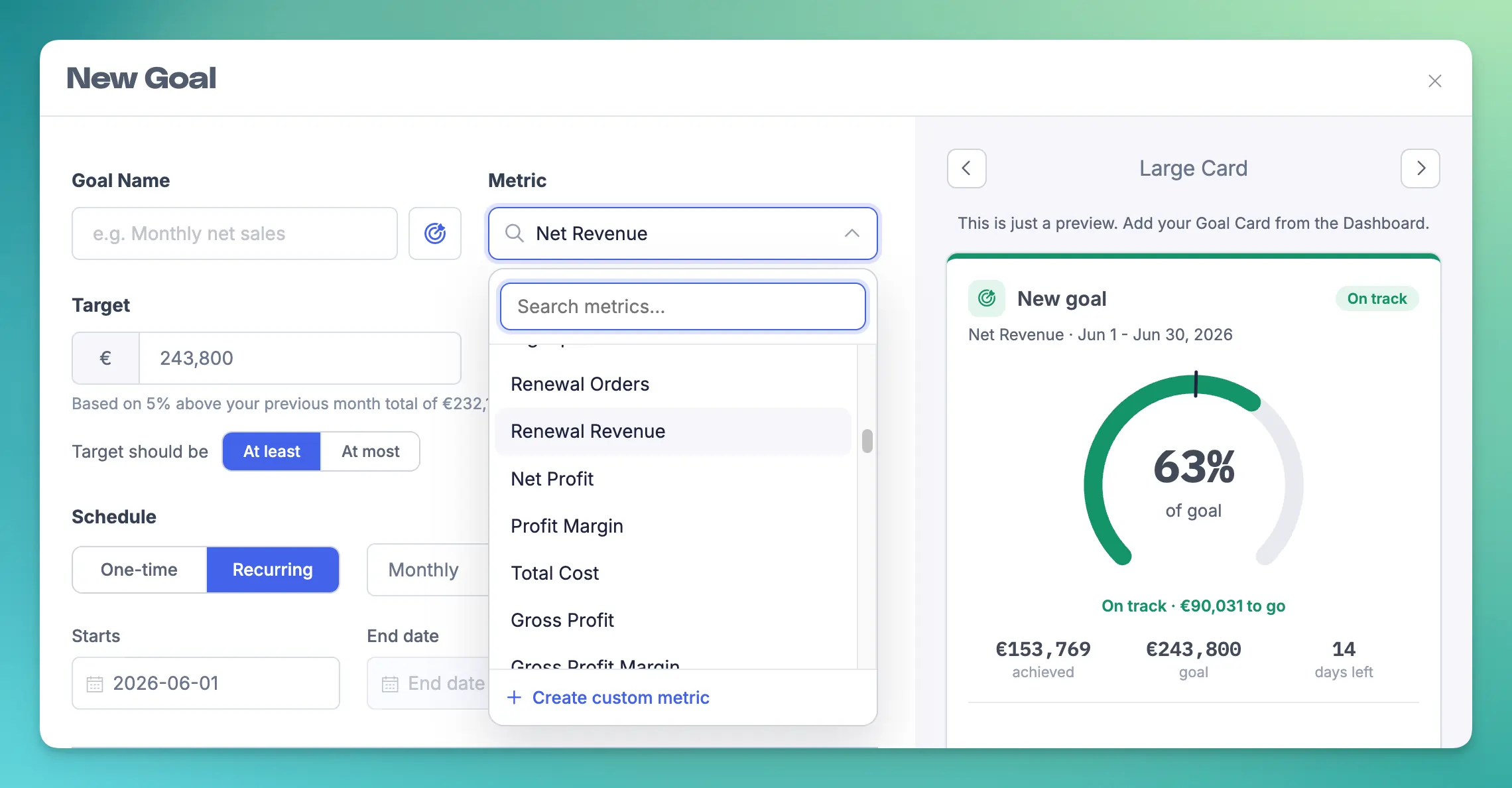
Track Net Revenue, Orders, New Customers, Net Sales, Gross Sales, or Items Sold, or build a custom metric or segment total and set a goal on that. It's not limited to total revenue; it's whatever you're actually trying to move.
📈 Pace, not just progress
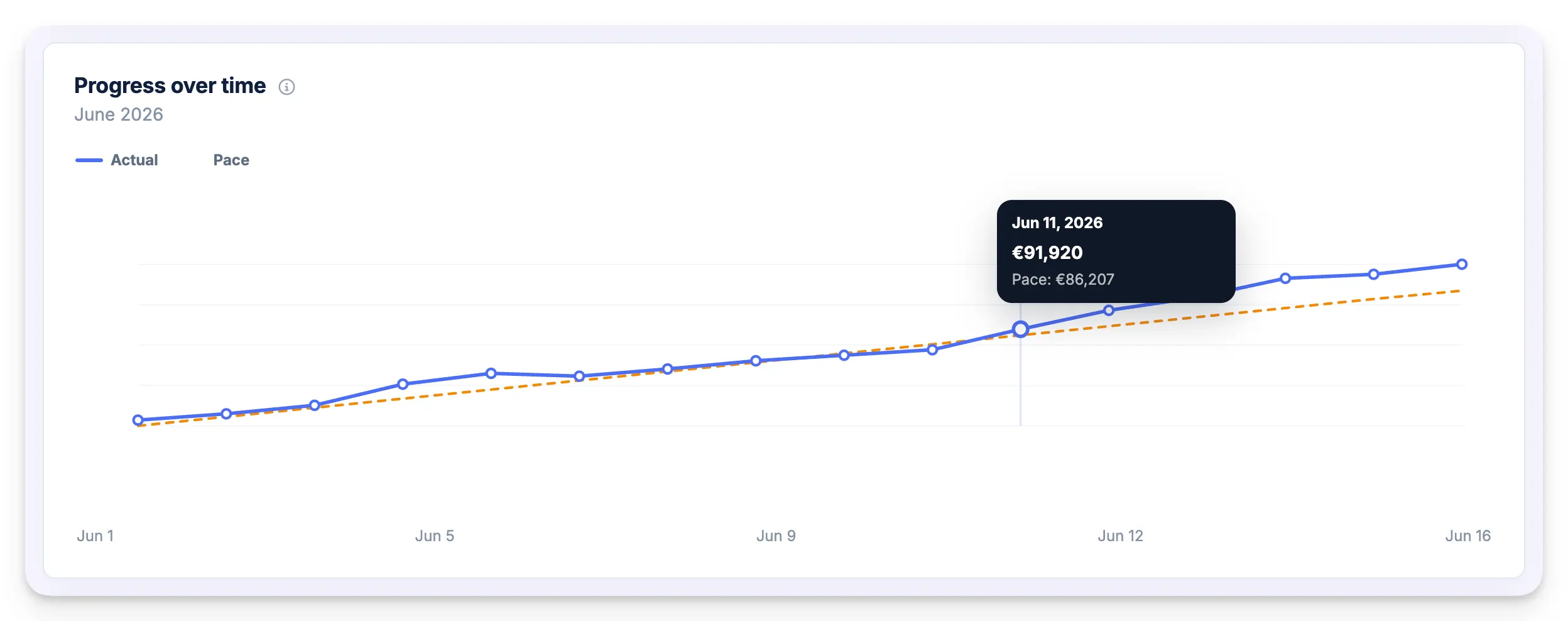
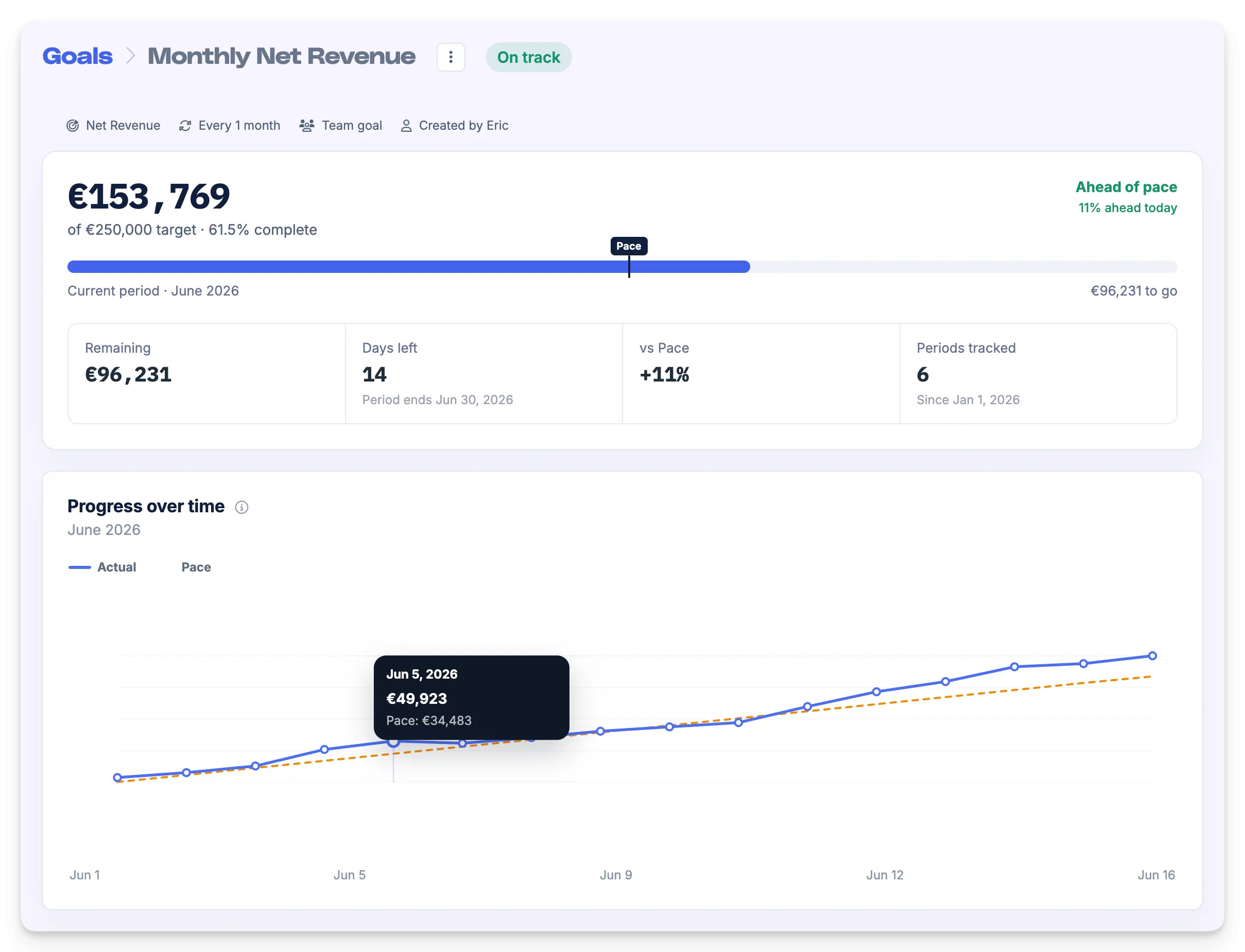
Every goal compares your actual results against the straight-line pace you'd need to finish on time. A marker sits on the progress ring at the point you should have reached by now, and a Progress over time chart plots your Actual numbers against the Pace line, so ahead or behind is obvious in a glance, not a calculation.
📅 Recurring goals that auto-roll over
Set a recurring goal (Daily, Weekly, Monthly, Quarterly, Yearly, or even a custom interval) and it resets and rolls forward automatically each period, with no end date if you want it to run indefinitely. Every period is saved in a Periods table with its own result and status, so you build a full history without lifting a finger. Each period even keeps its own target snapshot, so past results stay accurate even if you change the goal later.
👀 Always in view
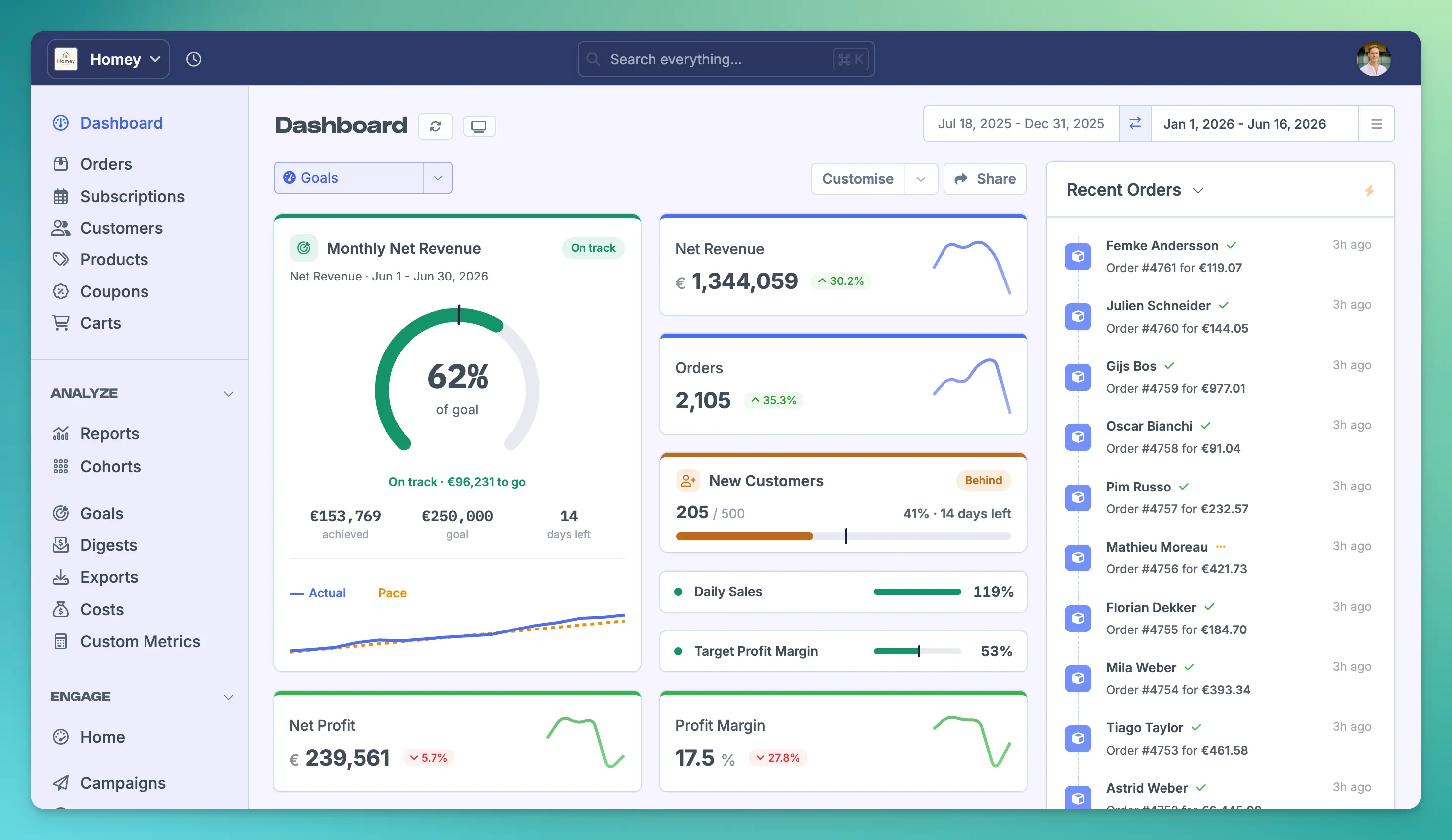
Pin any goal to your dashboard as a card, in whatever size fits, from a Large card with a full progress circle and trend chart down to a Slim progress bar. Cards are colour-coded by status and update automatically as new data comes in.
Set up your first goal in under a minute
In Metorik, go to Analyze → Goals and click Create your First Goal (or New Goal if you already have some).
Give it a Goal Name, something like Monthly Net Revenue or BFCM Revenue.
Choose the Metric you want to track: Net Revenue, Orders, New Customers, etc. You can even select a Saved Segment Total, or a custom metric.
Set your Target. Metorik suggests one at 5% above your previous period total, so you can start from a sensible number and adjust as needed.
Choose if you want to meet or exceed this target (at least), or if you want to keep under this target (at most).
Pick a Schedule: One-time for a fixed range like a sale or product launch, or Recurring for repeating targets (Daily, Weekly, Monthly, Quarterly, Yearly, or a custom interval such as every 3 weeks).
Set the Starts date. For one-time goals, add an Ends date; for recurring goals, leave No end date checked to let it roll indefinitely.
Check the live preview on the right to see how the card will look, then click Save Goal.
That's it, your goal starts tracking straight away.
To put it on your dashboard, head to your Dashboard, click Customise, add a Goal card, choose the goal and a size, and click Insert. And if you want to open up the full picture on any goal (current progress, your pace status, the Actual-vs-Pace chart, and the per-period history), just click it on the Goals page.
By default, goals are visible and editable by your whole team. You can change who can view or edit a goal from the permission row when creating or editing it.
A few goals worth starting with
Not sure where to begin? Here are a few ideas to get your started:
Monthly Net Revenue: recurring, the classic. Set it once and let it roll.
New Customers: a growth goal that isn't just top-line revenue.
Refunds: keep your total refunds under a certain amount each month.
Discounts: keep an eye on what % of orders have a discount.
A one-time BFCM or launch target: track a big event on its own, separate from the monthly line.
A custom metric or segment: goal something specific, like the revenue from a key product line or customer segment.
Available now, on every plan
Metorik’s Goals/Targets feature is live today and there’s no add-on or special plan required. Like every Metorik feature, it's included on all plans, for all stores, for unlimited users, across both Shopify and WooCommerce.
If you're already on Metorik, you'll find it in your account under Analyze → Goals right now.
Give it a go and let us know what you think!
If you're a Metorik customer, go set up your first goal. It takes about a minute, and you'll know exactly where you stand from day one. If you're not on Metorik yet, you can try everything free for 30 days.
This is the first in a short series on getting the most out of Goals. We'll be digging into pace tracking, recurring goals, setting goals on any metric, and more over the coming weeks.


-1549438730.jpg)